Picking a spot
Too many tabs, zero decisions.
 NextMove!Get the app
 Personalized outing planner
NextMove is an iPhone app for discovering places to go, things to do, restaurants, and activities. Choose your location, time, and budget to generate a personalized itinerary with real stops and directions.
For iPhone · Free download · Subscription required
🧸 🍦 🌇


What kills the plan first?
Too many tabs, zero decisions.
No surprise costs halfway through.
One route the whole group can see.
Fresh plans without another scroll.
Built around your preferences
Use the same controls you already use to make plans with friends—without opening twelve tabs.
Real spots—not a vague list
Sample itinerary. Prices are illustrative estimates; confirm current venue prices and reservations before going.
STOP 01FAO Schwarz · Rockefeller Center
Start with an interactive plush-shopping keepsake.
$70+ · 45 minSTOP 02SoHo, New York
An immersive, sweet, photo-ready middle stop.
$39+ · 90 minSTOP 03Williamsburg, Brooklyn
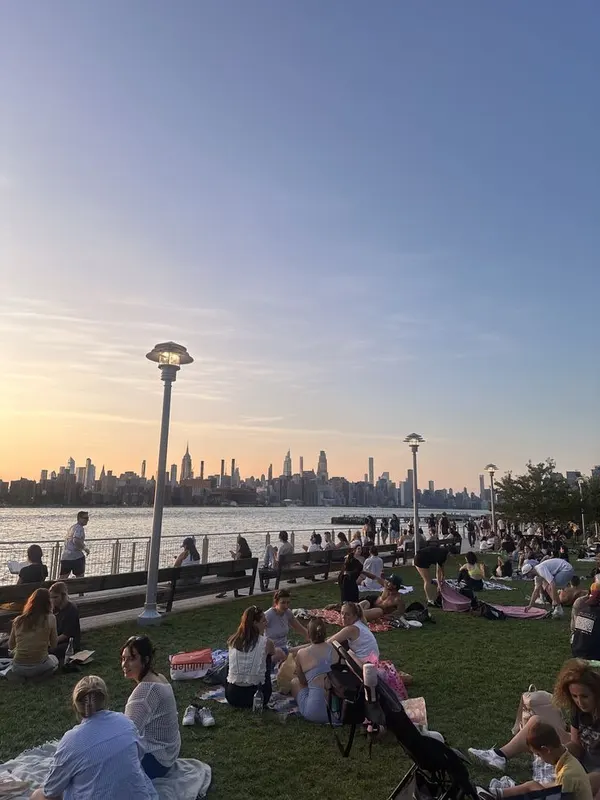
A free golden-hour skyline finish by the water.
Free · 60–90 minInside NextMove
TikTok
Paste the video that inspired you. NextMove finds the spot, then builds the rest of the outing around it.
Explore
Set your group size, budget, interests, location, radius, time, and transport. Then generate something you can actually do.
Plan
See the full route on a map, open stops in Maps, and ask Scout the follow-up questions that matter.
Photos
Complete a stop, add your photo, and turn the day into a journey you can keep.
Me
Your saved plans, favorite spots, plan history, and planning defaults stay close for the next time.

Start from the thing you saved
Drop a TikTok link. NextMove scouts the place in it, then uses your saved budget, time, group size, and travel style to build the nearby stops.
Photo → stamp → journey
Complete a stop, add your photo, and NextMove keeps it connected to the place, date, and little note behind it.
 Brooklyn · Saturday night
 little moments, taped in place.
Privacy, without the mystery
Places to go. Things to do.
Find activities, date ideas, and places to visit. Pick a guide, then make the outing your own.
Find NYC activities, waterfront parks, indoor experiences, and a free ferry ride, with neighborhood tips and official visitor links.
Read the guide →6 picks · GuideDiscover Boston parks, the Freedom Trail, public art, an art museum, and a historic ship, with neighborhood and reservation advice.
Read the guide →6 picks · GuideChoose Miami street art, museums, gardens, Little Havana, and waterfront parks, with clear neighborhood and weather planning tips.
Read the guide →8 picks · GuideThings to do in Austin: 8 specific stops, practical outing advice, budget notes, and official visitor links to help plan your day.
Read the guide →8 picks · GuideThings to do in Chicago: 8 specific stops, practical outing advice, budget notes, and official visitor links to help plan your day.
Read the guide →8 picks · GuideThings to do in London: 8 specific stops, practical outing advice, budget notes, and official visitor links to help plan your day.
Read the guide →Good to know
NextMove is an iPhone app for discovering places to go, things to do, restaurants, activities, and personalized itineraries. Choose a location, budget, interests, group size, time, and transportation to generate a plan.
NextMove is free to download. An active NextMove Pro subscription is required to use the app’s features. Prices and trial eligibility are shown before purchase. The city guides on this website are free to read.
NextMove is available now on the App Store for iPhone.
Plan around cities, towns, regions, postal codes, and countries worldwide. The app and generated plans are in English.
Yes. Reroll the whole idea, remix it with a request, or replace only the stop that is not working.
NextMove does not continuously track your location in the background. Type a location or optionally use your current location when planning.
Your next move is waiting
Discover nearby places and turn them into a plan.

Free download. NextMove Pro subscription required.